About

Everything you need to
measure, document, and deliver
professional results.

Measure Tech PRO was built for the people who do the work — contractors, window and door installers, property inspectors, and field crews who need fast, accurate documentation from first site visit to final report. One app. iPhone, iPad, and Mac.

5 Layout types
Grid · Sketch · Document · Elevation · Drafting
19+ AI features
Powered by Gemini 2.5 Flash
130+ Pin types
Across 16 trade categories
3 Platforms
iPhone · iPad · Mac
Our Story

Built in the Field.
Refined on the Job.

Measure Tech PRO started with a simple frustration: field crews were losing time re-entering measurements, hunting for photos, and manually assembling reports. We built the tool we wished existed.

Today it's the all-in-one field measurement suite for installation crews, general contractors, and property inspectors — covering every step from first measurement to client-ready deliverable. Built with Swift, powered by LiDAR and AI, and designed to work the way you actually work on site.

Download Free See All Features →
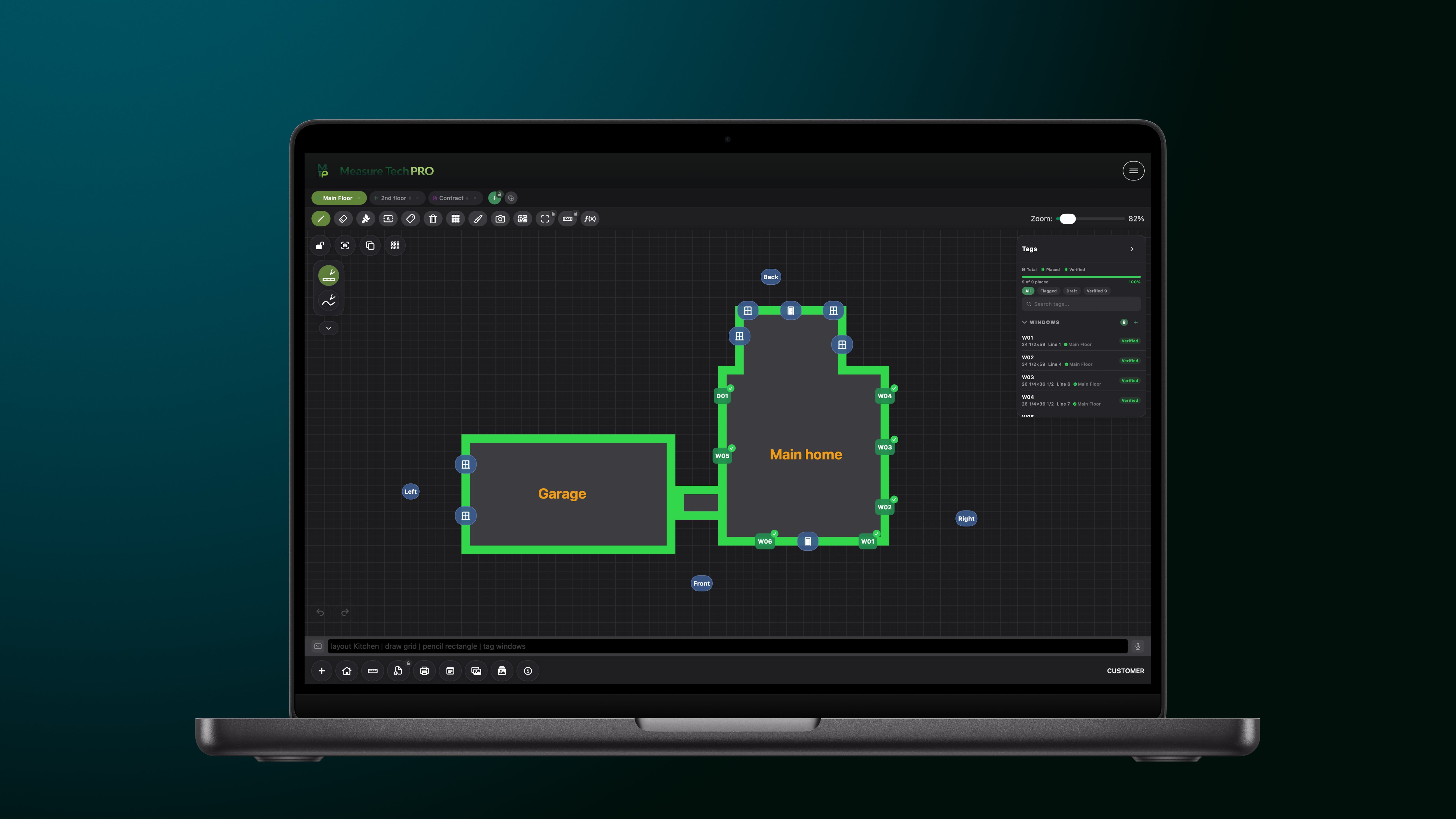
Measure Tech PRO on Mac — Grid floor plan
📐 Measure Tech PRO — Grid Layout
Floor plan grid with W01/D01 tag system · DXF · PDF export
What We Do

Eight Core Capabilities

Sourced directly from AccessManager.swift — the real feature set built into the app.

Measurements
Measurements
Take precise measurements on-site with AR and manual tools. LiDAR-powered capture for iPhone Pro and iPad Pro.
Photos
Photo Documentation
Capture and organize project photos with tags and markup. GPS coordinates embedded. Multi-capture mode for rapid field documentation.
Annotations
Annotations
Add labels, notes, and annotations to your floor plans. Five layout types from freehand sketch to CAD-precision drafting.
Exports
Exports
Export floor plans, reports, and images for clients. Branded PDF, DXF, DWG, SVG, and ProVia EntryLink integration.
Team
Team Management
Manage your team, invite members, and control access. Four roles (Admin, Manager, Member, Collaborator) with granular permissions.
Projects
Project Sharing
Share projects with team members for collaboration. Real-time sync, presence indicators, and remote cursor tracking.
Reports
Advanced Reports
Generate detailed client-ready reports with full data. Review dashboard for quality control before leaving the site.
Cloud
Cloud Documents
Store and edit documents in the cloud with real-time collaboration. Templates, spec sheets, and markup tools synced across all devices.
Who It's For

Built for the People Who Do the Work

Window Installers
Window & Door Installers
AI elevation scanning reads window and door positions from photos. Mull configuration builder handles multi-unit assemblies. Direct ProVia EntryLink export — no re-keying measurements between systems.
Contractors
General Contractors
Run multiple crews across multiple sites with real-time visibility. Markets and role-based access give every person exactly what they need. Review dashboard flags every incomplete tag before the crew leaves.
Inspectors
Property Inspectors
Document layout supports multi-page inspection templates. Voice dictation for hands-free field notes. GPS-tagged photos and branded PDF reports that match professional standards.
Technology

What Powers Measure Tech PRO

Built with the best tools Apple and Google have to offer — all sourced from the app's actual dependencies.

Firebase AI
Firebase AI — Gemini 2.5 Flash
Powers the AI Assistant, Elevation Scanner, AI tag creation, completeness checks, and all 19+ AI features. Cloud-based. Internet required.
LiDAR
LiDAR + RoomPlan (ARKit)
LiDAR mesh and tracked raycasts power AR Measurement on iPhone 12 Pro+ and iPad Pro (2020+). RoomPlan highlights likely doors and windows automatically.
Firebase
Firebase — Firestore & Storage
Real-time team sync via Firestore. Project photos, documents, and drawings stored in Firebase Storage. Role-based Security Rules enforce per-user permissions.
Speech
SFSpeechRecognizer (On-Device)
Voice input for the command bar uses Apple's on-device speech recognition — fast, private, and works without internet. Compatible with iOS 16+ and iPadOS 16+.
Apple
PencilKit & SwiftUI
Sketch and Document layouts use Apple's PencilKit for native Apple Pencil support. The entire app is built in SwiftUI, targeting iOS 16+, iPadOS 16+, and macOS 13+.
RevenueCat
RevenueCat + App Store
All subscriptions are processed through Apple's App Store via RevenueCat. We never receive or store payment card information. Entitlements are validated on-device.
DXF Engine
DXF / DWG / SVG Engine
DXF files import and export on-device. DWG files are cloud-converted. Exports include INSUNITS metadata for AutoCAD compatibility. Layer names, line types, and 6-decimal coordinate precision preserved.
EntryLink
ProVia EntryLink API
Direct integration with ProVia's EntryLink ordering system — createorder, additem, submitorder. Credentials stored securely in the iOS Keychain via com.measuretechpro.entrylink.
Cloud
iCloud Drive
Personal project storage and cross-device sync via iCloud. Supports the app's built-in iCloud container or a custom folder in iCloud Drive, Google Drive, or Dropbox.
Version History

Built Release by Release

Every version has added meaningful capability — sourced from ReleaseNotesView.swift in the app.

Full Release Notes →
May 2026 — v1.5.5
Team Gallery & Document Signatures
Team Gallery for cross-project photo browsing, document signatures with PDF export, 7 construction form templates, and DXF/SVG/DWG import into the CAD editor.
April 2026 — v1.5
CAD Drafting & Five Layout Types
Full CAD Drafting editor with layers, snap-to-grid, and DXF export. Sketch layout expanded with monoline, fountain pen, watercolor, and lasso. Share Extension for importing PDFs and blueprints from any app.
March 2026 — v1.4.7
Markets, Collaborators & Real-Time Sync
Markets & Organizations for multi-crew management. Collaborator role for read-only field access. Real-time team editing with live presence indicators and remote cursors.
February 2026 — v1.4.1
AI Elevation Scanner & Knowledge Base
AI-powered elevation scanning using Firebase Gemini. AI Assistant with 19+ commands. Built-in Knowledge Base with searchable docs, FAQs, tutorials, and the full command reference.
January 2026 — v1.3.2
Mull Configuration
Full mull configuration builder for multi-unit window assemblies. R.O. to exact size offset with per-window override. Interior/exterior measurement mode and leg height field for specialty windows.
December 2025 — v1.3.1
Pin Catalog & Fill Textures
122 pin types across 26 job presets. Fill texture catalog with favorites, recents, and category search. Collapsible tag panel with quick-capture pin photos.
November 2025 — v1.2
Custom Stickers & Tag Groups
Custom sticker library for photo markup with shared team sticker sets. Group tag management — duplicate, ungroup, and join in bulk. Redesigned tag picker with favorites.
October 2025 — v1.0
Launch
Grid-based floor plan editor, AR measurement, photo gallery with annotation, review dashboard, and PDF report generation for project handoff.
Tips & Tricks

From the App Itself

These load-screen tips are shown to users every time the app opens — sourced from AppSupportUI.swift.

Pinch to zoom out for a birds-eye view of your floor plan. Attach photos to tags — AI Suggest reads them for dimensions. Use the tag panel to track every window and door on site. Voice input lets you dictate notes hands-free on the job. Export your floor plan as a PDF report for clients. Use AR Measure for quick room dimensions on site. Flag tags to mark items that need a second look. Swipe between layouts to compare before and after. Pinch to zoom out for a birds-eye view of your floor plan. Attach photos to tags — AI Suggest reads them for dimensions. Use the tag panel to track every window and door on site. Voice input lets you dictate notes hands-free on the job. Export your floor plan as a PDF report for clients. Use AR Measure for quick room dimensions on site. Flag tags to mark items that need a second look. Swipe between layouts to compare before and after.
Get in Touch

Questions? We'd love to hear from you.

Whether it's a feature request, a bug report, a partnership inquiry, or just feedback — reach out. We read every email.

Email Support Visit Support Center →

📧 General & Support: support@measuretechpro.com

⚖️ Legal & Privacy: legal@measuretechpro.com

🔒 Privacy requests: privacy@measuretechpro.com

📱 Download Free View Pricing Privacy Policy Terms of Service